Old version
This is the CS 112 site as it appeared on May 12, 2023.
Problem Set 4
due by 11:59 p.m. on Wednesday, February 22, 2023
Preliminaries
In your work on this assignment, make sure to abide by the collaboration policies of the course.
If you have questions while working on this assignment, please come to office hours, post them on Piazza, or email instructor.
Make sure to follow the instructions outlined at the end of Part I and Part II when submitting your assignment.
Part I
40 points total
Creating the necessary folder
Create a subfolder called ps4 within your
cs112 folder, and put all of the files for this assignment in that folder.
Creating the necessary file
Problems in Part I will be completed in a single PDF file. To create it, you should do the following:
-
Access the template that we have created by clicking on this link and signing into your Google account as needed.
-
When asked, click on the Make a copy button, which will save a copy of the template file to your Google Drive.
-
Select File->Rename, and change the name of the file to
ps4_partI. -
Add your work for the problems from Part I to this file.
-
Once you have completed all of these problems, choose File->Download->PDF document, and save the PDF file in your
ps4folder. The resulting PDF file (ps4_partI.pdf) is the one that you will submit. See the submission guidelines at the end of Part I.
Problem 1: Understanding and using inheritance
10 points total; individual-only
Imagine that you wanted to capture information about a collection of different types of vehicles (cars, trucks, motorcycles, etc.). To do so, you could use inheritance to create a collection of related classes whose inheritance hierarchy looks like this:
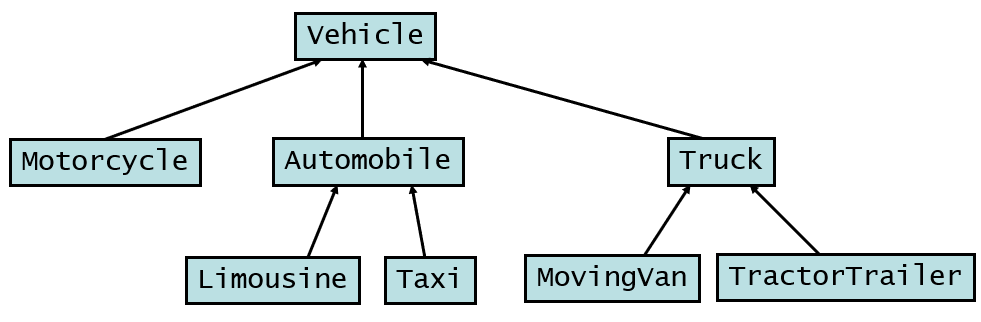
We have provided an implementation of most of these classes in this folder, and we encourage you to review the provided files. They include:
-
a class called
Vehiclethat defines the state (fields) and behavior (methods) that are common to all vehicles; it does not explicitly extend another class -
a class called
Motorcyclethat can be used to create objects that represent motorcycles; it inherits all of its fields and methods fromVehicle, with the exception of its own constructor -
a class called
Automobilethat can be used to create objects that represent cars; it also inherits fields and methods fromVehicle, but it adds some new fields and methods that are only needed by cars, and it overrides the inheritedtoString()method with its own version -
a class called
Truckthat can be used to create objects that represent trucks; it also inherits fields and methods fromVehicle, but it adds some new fields and methods that are only needed by trucks, and it overrides the inheritedtoString()method with its own version -
a class called
Taxithat can be used to create objects that represent cars; it inherits its fields and methods fromAutomobile, but it adds some new fields and methods that are only needed by taxis, and it overrides the inheritedtoString()method with its own version -
a class called
TractorTrailerthat can be used to create objects that represent tractor trailors; it inherits its fields and methods fromTruck, but it adds some new fields and methods that are only needed by tractor trailers, and it overrides the inheritedgetNumAxles()method with its own version.
The hierarchy diagram above includes a Limousine class and a
MovingVan class, but we have not defined those classes yet.
In the Problem 1 section of your ps4_partI document (see above),
answer the following questions:
-
(1 point) Which of the classes that are shown in the diagram above are a subclass of the
Automobileclass? -
(1 point) If we have a
Motorcycleobject that has been assigned to a properly declared variablem, is it possible to make the following call?m.getNumSeats()
Explain briefly why or why not.
-
Write a definition for the
MovingVanclass that takes full advantage of inheritance.A
MovingVanobject should have all of the same state and behavior as aTruckobject. In addition, it should maintain additional state that keeps track of:- the distance from the ground to the floor of the cargo area (a positive integer)
- whether it has a ramp (true or false)
When a
MovingVanobject is printed, we want to see its capacity, its distance to the cargo area, and whether it has a ramp. For example:capacity = 10000, distance to cargo = 5, has a ramp
In your
ps4_partIfile, add a definition of this class that includes the following:-
(1 point) a class header that sets up the appropriate inheritance
-
(2 points) appropriate fields – i.e., whatever fields are needed to capture the state of a
MovingVanobject. Make sure that you take inheritance into account when deciding which fields to include. -
(2 points) a constructor that takes as parameters the make, model, year, number of wheels, and distance to the cargo area, and a boolean value indicating whether the moving van has a ramp. The constructor should ensure that the object is not put in an invalid state (throwing an exception as needed), and it should take whatever steps are needed to initialize the object.
-
(3 points) any necessary methods. It should be possible for a client to obtain the value of any of the fields, and to change the value of any field that can be changed in a
Truckobject. However, you should assume that the portion of the state specifying the distance to the cargo area and the presence or absence of a ramp will never change, and thus mutator methods are not needed for those fields. You also don’t need to define anequalsmethod for this class.
Problem 2: Inheritance and polymorphism
18 points total; 2 points each part; individual-only
Imagine that you have a set of related classes that have been defined using inheritance. Here are the key facts about these classes:
-
Class
Geedoesn’t explicitly extend a class (i.e., it doesn’t have anextendsclause in its class header). Its class members (i.e., its fields and methods) include:- an integer field called
c - a string field called
d - a non-static method called
how()that takes no inputs and returns a string - a non-static method called
where()that takes a string and returns an integer - its own
toString()method that overrides the inherited one.
- an integer field called
-
Class
ZeeextendsGee. In addition to the members that it inherits, it has:- a string field called
a - its own method called
how()that overrides the inherited one - its own method called
why()that takes two integers and returns adouble - its own
equals()method that overrides the inherited one.
- a string field called
-
Class
TeeextendsZee. In addition to the members that it inherits, it has:- a string field called
x - its own method called
why()that overrides the inherited one. - its own
toString()method that overrides the inherited one.
- a string field called
-
Class
YeeextendsGee. In addition to the members that it inherits, it has:- integer fields called
eandf - its own method called
where()that overrides the inherited one - its own
equals()method that overrides the inherited one.
- integer fields called
In addition, you should make the following assumptions:
-
All of the classes employ appropriate encapsulation.
-
Each class has a constructor that takes no parameters and initializes the newly created object’s fields with their default values.
-
Each class includes an appropriate accessor method for each field that is declared in that class. For example, the
Geeclass would have accessor methods calledgetC()andgetD(). -
Each class includes an appropriate mutator method for each field that is declared in that class. For example, the
Geeclass would have mutator methods calledsetC()andsetD().
Answer the following questions in light of the above information about these classes. Before you begin, you may find it helpful to draw an inheritance hierarchy for the classes, although doing so is not required.
-
(2 points) The information above states that the
Geeclass has its owntoString()method that overrides the inherited one. Where does thetoString()method thatGeeoverrides come from? Be as specific as possible, and explain your answer briefly. -
(2 points) List all of the fields in a
Teeobject – both the ones that it declares and the ones (if any) that it inherits. (Note that in our use of the terminology, all of the fields in a superclass are inherited by its subclasses – including the private ones.) -
(5 points) Consider the following code fragment:
Tee t1 = new Tee();
System.out.println(t1.why(5, 10));
System.out.println(t1.how());
System.out.println(t1.where("Waldo"));
System.out.println("my Tee is" + t1);
System.out.println(t1.equals(t1));
Each of the
printlnstatements in this code fragment displays the result of a method call. (This includes the fourthprintlnstatement, in which the Java interpreter calls a method on our behalf.) However, it is possible that one or more of these methods calls would fail to compile because the necessary method is neither defined in theTeeclass nor inherited from a superclass ofTee.In section 2-3 of
ps4_partI, we have included a table that you should complete with appropriate information about each of these method calls. We have filled in the first row for you, and you should complete the remaining rows. -
(3 points) Now imagine that you want to add a non-static method to the
Yeeclass. It should be calledtotal(), it should take no parameters, and it should return the sum of all of the integer fields in the calledYeeobject. Add a full definition of that method to section 2-4 of yourps4_partIfile. Make sure to take into account the fact that the classes employ proper encapsulation. -
(6 points) For each of the following assignment statements, indicate whether it would be allowed according to the rules of polymorphism, and explain briefly why or why not.
-
Gee g = new Tee(); -
Tee t = new Zee(); -
Zee z = new Yee(); -
Object o = new Zee();
-
Problem 3: Memory management and the ArrayBag class
12 points total; individual-only
In this problem, you will draw a series of memory diagrams that illustrate
the execution of a program that operates on objects of the ArrayBag
class from lecture.
Consider the following Java program:
public class ArrayBagTest {
    public static void main(String[] args) {
        ArrayBag b1 = new ArrayBag(3);
        ArrayBag b2 = b1;
        ArrayBag b3 = new ArrayBag(3);

        // part 1: what do things look like when we get here?

        // part 2: what do things look like at the start of
        // this method call?
        b1.add("hey");

        b2.add("there");
        b3.add("hey");

        // part 3: what do things look like when we get here?

        System.out.println(b1);
        System.out.println(b2);
        System.out.println(b3);
    }
}
-
In section 3-1 of
ps4_partI, we have given you the beginnings of a memory diagram. On the stack (the region of memory where local variables are stored), we have included a frame for themainmethod. On the heap (the region of memory where objects are stored), we have included theArrayBagobject to which the variableb1refers and itsitemsarray. As usual, we have used arrows to represent the necessary references.Complete the provided memory diagram so that it shows what things look like in memory just before the call
b1.add("hey").To do so, you should:
-
Click on the diagram and then click the Edit link that appears below the diagram.
-
Make whatever changes are needed to the diagram. Below the thick horizontal line, we have given you a set of extra components that you can use as needed by dragging them above the thick line and putting them in the correct position. These components include
Stringobjects representing the strings"hey"and"there". You may not need all of the provided components. -
You can also edit any of the values in a field or array by clicking on the corresponding cell and editing the text that is inside the cell.
-
Once you have made all of the necessary changes, click the Save & Close button.
-
-
In section 3-2 of
ps4_partI, we have given you the beginnings of a memory diagram that you should complete to show what things look like in memory at the start of the execution ofb1.add("hey")—just before the first statement of that method is executed.Note: To save time, it should be possible to select and copy some of the components of your diagram for 3-1 and paste them into your diagram for 3-2.
-
In section 3-3 of
ps4_partI, we have given you the beginnings of a memory diagram that you should complete to show what things look like in memory after all of the calls toaddhave returned—just before theprintstatements execute inmain().Note: We have included a method frame for
add, but it may or not be needed in this diagram; you should delete it if you determine that it would no longer be present in memory. -
What would be printed by this program? You may find it helpful to consult the
toStringmethod of theArrayBagclass.
Submitting your work for Part I
Note: There are separate instructions at the end of Part II that you should use when submitting your work for that part of the assignment.
Submit your ps4_partI.pdf file using these steps:
-
If you still need to create a PDF file, open your
ps4_partIfile on Google Drive, choose File->Download->PDF document, and save the PDF file in yourps4folder. -
Login to Gradescope by clicking the link in the left-hand navigation bar, and click on the box for CS 112.
-
Click on the name of the assignment (
PS 4: Part I) in the list of assignments on Gradescope. You should see a pop-up window labeled Submit Assignment. (If you don’t see it, click the Submit or Resubmit button at the bottom of the page.) -
Choose the Submit PDF option, and then click the Select PDF button and find the PDF file that you created. Then click the Upload PDF button.
-
You should see a question outline along with thumbnails of the pages from your uploaded PDF. For each question in the outline:
- Click the title of the question.
- Click the page(s) on which your work for that question can be found.
As you do so, click on the magnifying glass icon for each page and doublecheck that the pages that you see contain the work that you want us to grade.
-
Once you have assigned pages to all of the questions in the question outline, click the Submit button in the lower-right corner of the window. You should see a box saying that your submission was successful.
Important
-
It is your responsibility to ensure that the correct version of every file is on Gradescope before the final deadline. We will not accept any file after the submission window for a given assignment has closed, so please check your submissions carefully using the steps outlined above.
-
If you are unable to access Gradescope and there is enough time to do so, wait an hour or two and then try again. If you are unable to submit and it is close to the deadline, email your homework before the deadline to
cs112-staff@cs.bu.edu
Part II
60 points total
Important
Don’t forget that each of your methods should be preceded by a comment that explains what your method does and what its inputs are. In addition, you should include a comment at the top of each Java file, and you should use good programming style more generally.
In addition, you should continue to follow the other guidelines
that we gave you in the prior problem sets. In particular, see the
section labeled Important guidelines that is available
here. You also should not use any methods
from the Arrays class as part of the methods that your write, as
indicated in the guidelines found
here.
Problem 4: Implementing the game of Blackjack
30 points; pair-optional
This is the only problem of the assignment that you may complete with a partner. See the rules for working with a partner on pair-optional problems for details about how this type of collaboration must be structured.
Overview
In Problem Set 3, you implemented a Card class for cards
that have a rank and a suit. In this problem, you will use that class
as part of a game of Blackjack in which a single human player (the
user) competes against a computer dealer.
In Blackjack, the goal is to assemble the hand with the highest value without going over a value of 21. Cards numbered 2-10 are worth their stated value (i.e., their value is equal to their rank). Face cards (Jacks, Queens, and Kings) have a value of 10. Aces have a value of 11, unless doing so would make the hand’s value exceed 21, in which case they have a value of 1. The best outcome is a combination of an ace with either a 10 or a face card; this gives a total value of 21 from only two cards, which is known as Blackjack.
The dealer starts by dealing two cards to the user of the game and two cards to herself. The dealer’s first card is dealt face down, and the other cards are revealed.
The user then begins their turn. They repeatedly decide whether to request another card (which is known as a hit) or to hold their current hand. The user’s turn continues until they choose to hold, or until the value of their hand is 21 or more.
Once the user’s turn is completed, the dealer begins her turn. She first reveals her hidden card. Then, provided that the user has not gone over 21, the dealer gives herself hits as needed in an attempt to win the game. In our version of Blackjack, the dealer will employ the following rules:
- If the user’s hand has a value that is less than 17, the dealer should take hits until the value of her hand exceeds the value of the user’s hand.
- If the user’s hand has a value of 17 or more, the dealer should take hits until the value of her hand matches or exceeds the value of the user’s hand, unless the user has Blackjack (in which case the dealer should hold, regardless of the value of her own hand).
Note: If the user goes over 21, the dealer won’t even be asked to decide whether to take a hit.
Sample runs
Here are some sample runs of the game:
- first sample run (random seed = 105)
- second sample run (random seed = 110)
Notes about the sample runs:
- See the section below entitled Testing your code for information about how to specify a random seed.
- In each sample run, user inputs are underlined.
Getting started
-
If you haven’t already done so, create a folder named
ps4for your work on this assignment. You can find instructions for doing so here. -
Put a copy of your
Card.javafile from Problem Set 3 in yourps4folder. Note: If you are working with a partner and you both have your own version of theCardclass, you should pick one of them to use for this assignment. -
Download the following files:
Make sure to put both of these files in your
ps4folder, along with yourCard.javafile. If your browser doesn’t allow you to specify where a file should be saved, try right-clicking on its link above and choosing Save as... or Save link as..., which should produce a dialog box that allows you to choose the correct folder for the file. -
In VS Code, select the File->Open Folder or File->Open menu option, and use the resulting dialog box to find and open the folder that you created for this assignment. (Note: You must open the folder; it is not sufficient to simply open the file.)
The name of the folder should appear in the Explorer pane on the left-hand side of the VS Code window, along with the names of the files.
Task 1: review the provided code
In the Explorer Pane, click on the name Blackjack.java, which will
open an editor window for that file.
This class contains the main method of the program; you will run
this class to start the program. The class also includes several
static methods, two of which you will need to complete or modify. Note
that this class is not a blueprint class. It has no fields, and all
of its methods are static because they do not need a called
object. You should not make any modifications to this class except
for the changes specified in Tasks 3 and 4. In addition, this class
will not compile until you complete Task 2 below.
Begin by reading over the code that we have given you. In particular,
you should look at how the Blackjack class will make use of the types
of objects that you will create below.
You do not need to fully understand how the Deck class works,
but we encourage you to look it over. It is a fully implemented class
that serves as a blueprint for objects that represent a deck of 52
playing cards implemented using the Card class. Deck objects have
several non-static methods, the most useful of which are the shuffle
and dealCard methods. It uses a random-number generator when
shuffling the cards to get a different ordering of the deck each time.
When testing your code, it’s possible to control the numbers generated
by the random-number generator so that you can get repeatable hands of
cards. See the section below entitled Testing your code for more
details. You should not modify the code in this class.
Task 2: create a blueprint class for a player
Write a class named Player that serves as a blueprint for objects
that represent a single Blackjack player. Make sure to save it in
your ps4 folder.
Import the java.util package at the start of the file.
Each Player object should have the following components:
-
three fields:
- one called
nameto keep track of the player’s name (a single string) - one called
handfor an array to hold the cards in the player’s hand - one called
numCardsto keep track of how many cards are currently in the player’s hand Make sure that your field definitions prevent direct access by code from outside the class.
- one called
-
a constructor that takes a single parameter for the name of the player. It should initialize all of the fields. Among other things, it should create the array that will store the cards. Make the collection big enough to store the maximum number of cards in a given hand (11). Use the class constant
Blackjack.MAX_CARDS_PER_PLAYERto specify this value, rather than hard-coding the integer 11. -
an accessor named
getNamethat returns the player’s name. -
an accessor named
getNumCardsthat returns the current number of cards in the player’s hand. -
a
toStringmethod that just returns the player’s name. -
a mutator named
addCardthat takes aCardobject as a parameter and adds the specified card to the player’s hand, filling the array from left to right. It should throw anIllegalArgumentExceptionif the parameter isnull, or if the player already has the maximum number of cards. -
an accessor named
getCardthat takes an integer index as a parameter and returns theCardat the specified position in the player’s hand, without actually removing the card from the hand. For example, ifpis aPlayer,p.getCard(0)should return the card at position 0 inp‘s hand – i.e., the first/leftmost card. If the specified index does not correspond to one of the cards in the hand, the method should throw anIllegalArgumentException. -
an accessor method named
getHandValuethat computes and returns the total value of the player’s current hand – i.e., the sum of the values of the individual cards. Use thegetValuemethod from theCardclass to get each card’s value.One tricky aspect of this method is handling any Aces that may be present in the hand. The
getValuemethod will return 1 for an Ace, but you may need to change its value to 11 depending on the values of the rest of the cards in the hand. Hint: If there is more than one Ace in the hand, at most one of them can have a value of 11, and you should only give it a value of 11 if doing so won’t cause the hand’s total value to exceed 21. -
an accessor method named
printHandthat prints the current contents of the player’s hand, followed by the value of the player’s hand. For example:4H 7C QD (value = 21)
Notes:
-
The spacing matters. There should be two spaces between the strings for the individual cards, and two spaces between the last card’s string and the left parenthesis at the start of the value.
-
This method should not print the player identifiers (“dealer: ” or “you: “) that come before the hands in the sample runs.
-
-
an accessor method named
hasBlackjackthat returnstrueif the player has Blackjack (a two-card hand with a value of 21), andfalseotherwise. This method will be relatively simple to write if you take advantage of one or more of the other methods that you’ve already written. -
an accessor method called
wantsHitthat should returntrueif the player wants another hit, andfalseif the player does not want another hit. The method should take two parameters: aScannerobject that can be used to read from the console, and aPlayerobject representing the player’s opponent (in that order). In this version of the method:- You should print the appropriate prompt asking if the user wants
a hit (see the sample runs), and read a string from the console
using the
nextLinemethod of theScannerpassed in as a parameter. (Make sure that you do not use theScanner‘snext()method.) The method should returntrueif the user enters “y” or “Y”, and it should returnfalseif the user enters any other input (even if it’s something other than “n” or “N”). - You should ignore the second parameter (the
Playerobject for the opponent). The version of this method that you will write in Task 3 will use this second parameter, which is why we include it here as well.
- You should print the appropriate prompt asking if the user wants
a hit (see the sample runs), and read a string from the console
using the
-
a mutator method called
discardCardsthat should get rid of all of the cards in the player’s hand, to prepare for a new round of the game. There are different ways to accomplish this. The key thing is to ensure that immediately after this method is called, all other methods that depend on the number of cards in the player’s hand should behave as if the player has no cards.
After completing all of Task 2, you should be able to run
the Blackjack class to play the game.
When running the program, you should highlight Blackjack.java in the
list of files before using F5 to run the program. Another option is
to right-click on the name of the file in the Explorer pane and choose
Run or Run Java.
At this point, the computer will be represented by a Player object,
which means that you will be able to see all of its hand, and that its
decisions about hits will be determined using the wantsHit method
that you implemented above. In other words, you will need to decide on
hits for both the user (i.e., you) and the dealer.
If VS Code reports problems in the Blackjack class, that probably
means that there are problems in the headers of one or more of your
Player methods. Change your Player class as needed until the
Blackjack class compiles and runs. Remember that you are not
allowed to change the Deck class in any way. In addition, you should
not change the Blackjack class at this point in the process.
Task 3: create a blueprint class for the dealer
The Player class that you wrote for Task 2 serves as a blueprint for
the human player in the game (the user). The dealer is also a player in
the game, but the dealer’s behavior is different in several respects
than the behavior of the user.
In this task, you will write a class named Dealer that serves as a
blueprint for an object that represents the dealer in the
game. Save it your ps4 folder, and import the java.util
package at the start of the file.
Much of the state and behavior needed for a Dealer object is already
present in the Player class. Thus, you should make Dealer a subclass
of Player, so that it will inherit the fields and methods of the
Player class.
In addition to the inherited fields and methods, this class will need:
-
a field of type
booleanthat indicates whether or not the dealer’s first card should be revealed when the hand is printed. Make sure that the field is properly encapsulated. -
its own constructor, which takes no parameters. It should call the constructor of the superclass to do the work of initializing the inherited fields, passing it the string “dealer” as the name of the player. In addition, it should initialize the
booleanfield to reflect the fact that the dealer’s first card should not be revealed at the start of a given round of the game. -
a mutator method called
revealFirstCardthat takes no parameters and changes the value of the called object’sbooleanfield to indicate that the dealer’s first card should now be revealed. Note that this method will not actually print any cards on its own. Rather, by changing the value of thebooleanfield, it will cause subsequent calls to theprintHandmethod to reveal the first card. -
a
printHandmethod that overrides the inherited version of that method. This version of the method should consult the called object’sbooleanfield to determine what to do:- If the
booleanfield indicates that the first card should not be revealed, then it should display the String “XX” in place of the first card’s usual string. In addition, it should not print the value of the hand. For example, here is one possible output of this method when the first card is hidden:XX 8C - If the
booleanfield indicates that the first card should be displayed, then this method should produce the same output as the superclass version of the method.
This method – like all subclass methods – does not have direct access to the fields inherited from the superclass. For example, it cannot directly access the array of cards. Instead, it should make use of the appropriate accessor methods as needed (e.g., to get the cards that it needs to print).
- If the
-
a
wantsHitmethod that overrides the inherited version of that method. This version of the method should determine if the dealer should give herself another hit, and returntrueorfalseaccordingly. See the section above entitled “Rules of the game” to see when the dealer should take another hit and when she should hold. Note that this method will ignore the first parameter of the method (theScannerobject), but it will use the second parameter of the method to obtain the necessary information about the opponent’s hand. -
a
discardCardsmethod that overrides the inherited version of that method. This version of the method should have the same effect as the inherited version of the method. In addition, it should reset the called object’sbooleanfield to its original value, so that the first card in the dealer’s next hand will not be revealed when the hand is first printed.
Notes:
- When you override a method, make sure that you give it the same header as the method that’s being overriden.
- For at least one of the above methods, you will need to call the
superclass version of the same method (i.e., the version that you
overrode) by using the keyword
super. Even in cases in which it is not essential to call the superclass method, you should do so if it would allow you to simplify your code.
Once you have defined your Dealer class, you should make the following
changes to the Blackjack class:
-
Modify the line in the
mainmethod that creates an object for the dealer (assigning it to the variabledealer). Instead of assigning aPlayerobject to that variable, you should assign an instance of your new subclass. The modified line should look like this:Player dealer = new Dealer();
Note that you should not change the declared type of the variable, because doing so would cause some of the other
Blackjackcode to break. Polymorphism allows us to assign an object of typeDealerto a variable of typePlayer, becauseDealeris a subclass ofPlayer. -
Uncomment the line in the
playRoundmethod that calls therevealFirstCardmethod.
You should not make any other changes to the Blackjack class except
the change described below in Task 4.
If you have implemented everything correctly, the dealer’s first card and value should be hidden during the user’s turn, and the dealer should decide on its own hits, rather than asking you to make its decisions for it.
Task 4: Implement the printResult method
In Blackjack.java, implement the printResult method so that it
prints an appropriate message summarizing the results of a given hand.
Here are some special points to keep in mind when writing this method:
- If the user goes over 21, they lose the game, regardless of the contents of the dealer’s hand.
- If the user gets 21 from their first two cards, a special “Blackjack!” message should be displayed unless the dealer also has Blackjack (in which case it is a push).
- If the user and dealer both end up with the same value less than or equal to 21, the message “Push!” should be displayed to indicate a tie.
- If the user did not go over 21 and the dealer did go over, the user wins the game.
- Otherwise, the decision about who won should be based on which player has the hand with higher value.
See the sample runs above for what the result messages should look like. Note that the user’s name is included in several of the messages.
Once all of these tasks are completed, you should have a working Blackjack game!
Testing your code
To get repeatable hands for testing purposes, you can specify a seed
for the random-number generator used by the Deck class when it
shuffles the deck. Here is one way to do so:
-
As needed, open the folder containing your code by using the File->Open Folder or File->Open menu option in VS Code.
-
If you don’t already have a Terminal pane at the bottom of the VS Code window, use the Terminal->New Terminal menu option to open one.
-
Enter the following command from the Terminal to compile your code:
javac Blackjack.java
If executing this command produces error messages describing bugs in your code, fix them, save the file(s) in VS Code, and try again. Repeat this process until your code compiles without any error messages.
-
Enter the following command from the Terminal to run your code with a random seed:
java Blackjack seed
where you replace
seedwith an integer.
Other testing notes
-
If you make any changes to your code, make sure to:
-
Save the changed file(s) in VS Code.
-
Recompile your code by executing
javac Blackjack.java
before you attempt to rerun the program.
-
-
To make sure that the
wantsHitmethod in yourDealerclass is working correctly, you may want to temporarily comment out theprintHandmethod in that class. Doing so will cause all of the dealer’s cards to be displayed, which will allow you to see ifwantsHitis making the correct decision. Make sure to uncommentprintHandbefore submitting the file.
Problem 5: Adding methods to the ArrayBag class
30 points total; individual-only
Begin by downloading the following file:
ArrayBag.java
Make sure to put the file in your ps4 folder.
As needed, open your ps4 folder in VS Code, and click on the name
of the newly downloaded file. You should see the ArrayBag class
from lecture.
Add the methods described below to the ArrayBag class, and then add
code to the main() method to test these methods. You should not
add any new fields to the class.
-
public int size()
This method should return the maximum number of items that the calledArrayBagis able to hold. This value does not depend on the number of items that are currently in theArrayBag. Rather, it is the same value as the maximum size specified when theArrayBagwas created. For example:ArrayBag b1 = new ArrayBag(10); System.out.println(b1.size());
should output:
10
Hint: This method should only need one or two lines of code.
-
public int count(Object item)
This method should return a count of the number of times that the parameteritemoccurs in the calledArrayBag. For example:ArrayBag b2 = new ArrayBag(10); int[] vals = {7, 5, 3, 7, 7, 2, 5}; for (int x : vals) { b2.add(x); } System.out.println(b2.count(2)); System.out.println(b2.count(7)); System.out.println(b2.count(8));
should output:
1
3
0
Your method must not change the internals of the
ArrayBagobject. -
public boolean reduceSize(int decrease)
This method should reduce the size of the calledArrayBagby the specified amount – but only if it is feasible to do so. For example, ifbhas a size of 20, thenb.reduceSize(5)should giveba size of 15.However, the requested change should only be made if it doesn’t cause the
ArrayBagto be too small for its current contents. If the requested reduction in size wouldn’t leave enough room for all of the items in theArrayBag, the method should returnfalseand it should not make any changes.If the requested reduction can be made, you will need to create a new array with just enough room for the new size, copy any existing items into that array, and replace the original array with the new one by storing its reference in the called object. Finally, the method should return
trueto indicate success.For example, the following test code:
ArrayBag b3 = new ArrayBag(8);
b3.add("hello");
b3.add("world");
System.out.println(b3);
System.out.println("size before: " + b3.size());

b3.reduceSize(5);
System.out.println(b3);
System.out.println("size after: " + b3.size());
should produce the following output:
{hello, world}
size before: 8
{hello, world}
size after: 3
Other special cases:
- If
decreaseis 0, the method should just returntrue. - If
decreaseis negative, the method should throw anIllegalArgumentException.
- If
-
public boolean equals(ArrayBag other)
This method should determine if the calledArrayBagis equal to the parameterother. Two bags are equal if they contain the same items. The location of the items in the bags does not matter (e.g.,{5, 6, 6, 7}is equal to{7, 6, 5, 6}), but bags that are equal must have the same number of occurrences of each item (e.g.,{5, 6, 6, 7}is not equal to{5, 6, 7}). The method should returntrueif the two bags are equal, andfalseotherwise (including cases in which the parameter isnull).Notes:
-
Your method must not change the internals of either
ArrayBagobject. -
For full credit, you should take advantage of the one of the other methods that you are implementing for this problem. Doing so will make your job much easier!
-
-
public ArrayBag subtract(ArrayBag other)
This method should create and return anArrayBagcontaining one occurrence of any item from the calledArrayBagobject that is not also present in theArrayBagrepresented by the parameterother. For full credit, the resulting bag should not include any duplicates. For example, ifb1represents the bag{2, 2, 3, 5, 7, 7, 7, 8}andb2represents the bag{4, 5, 6, 8}, thenb1.subtract(b2)should return anArrayBagrepresenting the bag{2, 3, 7}. Note that the resulting bag should not include the 5 or 8 fromb1, because those values are also inb2.Give the new
ArrayBaga maximum size that is equal to the number of items in the calledArrayBag(but see below for an exception). The order of the items in the returnedArrayBagdoes not matter.Special cases:
-
If the parameter is
null, the method should throw anIllegalArgumentException. -
In general, the returned
ArrayBagshould have a maximum size that is equal to the number of items in the calledArrayBag. However, because it’s not possible to construct anArrayBagwith a maximum size of 0, you should give the newArrayBaga maximum size of 1 if the calledArrayBaghas no items.
Notes:
-
Your method must not change the internals of either of the original
ArrayBagobjects. -
For full credit, you should take full advantage of the existing
ArrayBagmethods. They will make your job much easier!
Here is some additional test code:
ArrayBag b5 = new ArrayBag(10);
String[] letters5 = {"a", "a", "b", "d", "f", "f", "f", "g"};
for (String ltr: letters5) {
    b5.add(ltr);
}
System.out.println(b5);

ArrayBag b6 = new ArrayBag(7);
String[] letters6 = {"b", "c", "e", "e", "g"};
for (String ltr: letters6) {
    b6.add(ltr);
}
System.out.println(b6);

ArrayBag b7 = b5.subtract(b6);
System.out.println(b7);
System.out.println(b7.numItems());
System.out.println(b7.size());
System.out.println(b5);   // make sure original bags are unchanged
System.out.println(b6);
Running it should output:
{a, a, b, d, f, f, f, g}
{b, c, e, e, g}
{a, d, f}
3
8
{a, a, b, d, f, f, f, g}
{b, c, e, e, g}
Note: The items in the result (
{a, d, f}) can appear in any order. -
Submitting your work for Part II
Note: There are separate instructions at the end of Part I that you should use when submitting your work for that part of the assignment.
You should submit only the following files:
Blackjack.javaPlayer.javaDealer.javaArrayBag.java
You should not resubmit your Card.java. We will use our
version of that class when testing your code.
Make sure that you do not try to submit a .class file or a file
with a ~ character at the end of its name.
Here are the steps:
-
Login to Gradescope as needed by clicking the link in the left-hand navigation bar, and then click on the box for CS 112.
-
Click on the name of the assignment (
PS 4: Part II) in the list of assignments. You should see a pop-up window with a box labeled DRAG & DROP. (If you don’t see it, click the Submit or Resubmit button at the bottom of the page.) -
Add your files to the box labeled DRAG & DROP. You can either drag and drop the files from their folder into the box, or you can click on the box itself and browse for the files.
-
Click the Upload button.
-
You should see a box saying that your submission was successful. Click the
(x)button to close that box. -
The Autograder will perform some tests on your files. Once it is done, check the results to ensure that the tests were passed. If one or more of the tests did not pass, the name of that test will be in red, and there should be a message describing the failure. Based on those messages, make any necessary changes. Feel free to ask a staff member for help.
Note: You will not see a complete Autograder score when you submit. That is because additional tests for at least some of the problems will be run later, after the final deadline for the submission has passed. For such problems, it is important to realize that passing all of the initial tests does not necessarily mean that you will ultimately get full credit on the problem. You should always run your own tests to convince yourself that the logic of your solutions is correct.
-
If needed, use the Resubmit button at the bottom of the page to resubmit your work. Important: Every time that you make a submission, you should submit all of the files for that Gradescope assignment, even if some of them have not changed since your last submission.
-
Near the top of the page, click on the box labeled Code. Then click on the name of each file to view its contents. Check to make sure that the files contain the code that you want us to grade.
Important
-
It is your responsibility to ensure that the correct version of every file is on Gradescope before the final deadline. We will not accept any file after the submission window for a given assignment has closed, so please check your submissions carefully using the steps outlined above.
-
If you are unable to access Gradescope and there is enough time to do so, wait an hour or two and then try again. If you are unable to submit and it is close to the deadline, email your homework before the deadline to
cs112-staff@cs.bu.edu