Problem Set 5
due by 11:59 p.m. on Tuesday, October 20, 2026
Important
Don’t forget that each of your methods should be preceded by a comment that explains what your method does and what its inputs are. In addition, you should include a comment at the top of each Java file, and you should use good programming style more generally.
In addition, you should continue to follow the other guidelines that we gave you in the prior problem sets. In particular, see here.
Preliminaries
In your work on this assignment, make sure to abide by the collaboration policies of the course.
If you have questions while working on this assignment, please come to office hours or post them on Piazza.
Make sure to follow the instructions outlined at the end of Part I and Part II when submitting your assignment.
Part I
46 points total
Creating the necessary file
Problems in Part I will be completed in a single PDF file. To create it, you should do the following:
-
Open the template that we have created for these problems in Google Docs: ps5_partI
-
Select File->Make a copy..., and save the copy to your Google Drive using the name
ps5_partI. -
Add your work to this file.
-
Once you have completed all of these problems, choose File->Download->PDF document, and save the PDF file on your machine. The resulting PDF file (
ps5_partI.pdf) is the one that you will submit. See the submission guidelines at the end of Part I.
Problem 1: A method that makes multiple recursive calls
8 points; individual-only
A number of the algorithms that we consider in CS 112 involve recursive methods in which a given invocation of the method may make two or more recursive calls. To understand how this type of algorithm works, it helps to draw a call tree for a given set of initial parameters.
In this problem, you will draw such a call tree to illustrate the execution of a simple recursive method that operates on integers. You may find it helpful to review our solutions to the similar problem in Lab 5 problem before continuing.
Here is the method you will trace:
public static int foo(int x, int y) {
    if (y <= 0 || x <= 0 || Math.abs(x-y) >= 4) {
        return x+y;
    } else {
        int result1 = foo(x + 1, y - 2);
        int result2 = foo(x - 2, y + 1);
        return result1 + result2;
    }
}
Assume that we begin with the following initial call to this method:
foo(3, 3)
-
Construct a call tree that shows each invocation of the method, and that uses lines to connect a given invocation to the recursive calls that it makes (if any). Follow the same format that we use in our solutions for Lab 5.
In section 1-1 of
ps5_partI, we have given you an initial diagram.You should take the following steps to complete it:
-
Add each subsequent call with its parameters to the call tree in the appropriate place.
-
If a given call is a base case, simply put its return value under the call, as we do in our Lab 6, Task 2 solution for calls to
fib(1)andfib(0). -
If a given call is not a base case, use lines composed of
/or\characters to connect the call to the recursive call(s) that it makes. -
Precede each call with a number that indicates the overall order in which the calls were made.
-
-
Underneath your call tree, list the order in which the calls return, as well as their return values. When you refer to a given call in this part of the problem, use its number from the call tree.
For example, the initial call always returns last, so the last line in this part of the problem should look like this:
call 1 (foo(3,3)) returns ...
where you replace the
...with its return value.See our solution for Lab 5 for another example of what this part of your solution should look like.
Problem 2: Expressing Big-O
7 pts. total; individual-only
Express each of the following functions using Big-O notation.
Represent your answer as an equality (e.g., p(n) = O(n^2)).
The answer for function a(n) is given.
-
a(n) = 2n+1000 -
b(n) = n + 3n^2 + nlog(n) -
c(n) = 5nlog(n) + 10n^3 + n^2 + 10^4 -
d(n) = 8 + 9n + 4nlog(n) + √(n) -
e(n) = 12n + n^2 + 64 -
f(n) = 2n*n -
g(n) = 2^n
Problem 3: Computing Big-O
15 pts. total; individual-only
In each of the following code fragments, determine how many times the count()
method is called as a function of the variable n? Use big-O notation to express the
run-time efficiency of each method, and explain your answer briefly.
-
Code Fragment 1
for (int i = 0; i < n; i++)
   for (int j = 0; j < n; j++)
      for (int k = 0; k < j; k++)
         count();
-
Code Fragement 2
for (int i = n; i > 0; i/=2)
   for (int j = 0; j < n; j++)
      for (int k = 0; k < 1000; k++)
         count();
-
Code Fragment 3
for (int i = 0; i < n; i++) {
   for (int j = 0; j < 2*n; j++) {
      for (int k = n; k >= 1; k = k/2) {
         count();
      }
   }
}
-
Code Fragment 4
for (int i = 0; i < 3; i++) {
    for (int j = 0; j < n; j++) {
        for (int k = 0; k < j; k++) {
            count();
        }
    }
}
-
Code Fragment 5
for (int i = 0; i < n; i++) {
    for (int j = i; j < n; j++) {
            count();
    }
}
Problem 4: Comparing two algorithms
6 points; individual-only
Suppose that you want to count the number of duplicates in an unsorted array of n elements. A duplicate is an element that appears multiple times; if a given element appears x times, x - 1 of them are considered duplicates. For example, consider the following array:
{10, 6, 2, 5, 6, 6, 8, 10, 5}
It includes four duplicates: one extra 10, two extra 6s, and one extra 5.
Below are two algorithms for counting duplicates in an array of integers:
1. Algorithm A:
public static int numDuplicatesA(int[] arr) {
    int numDups = 0;
    for (int i = 0; i < arr.length - 1; i++) {
        for (int j = i + 1; j < arr.length; j++) {
            if (arr[j] == arr[i]) {
                numDups++;
                break;
            }
        }
    }
    return numDups;
}
What is the worst-case time efficiency of algorithm A in terms of the length n of the array? Use big-O notation, and explain your answers briefly.
2. Algorithm B:
public static int numDuplicatesB(int[] arr) {
    Sort.mergesort(arr); // we will cover mergesort on Tuesday, but it has O(nlogn) efficiency in both best and worst case
    int numDups = 0;
    for (int i = 1; i < arr.length; i++) {
        if (arr[i] == arr[i - 1]) {
            numDups++;
        }
    }
    return numDups;
}
What is the worst-case time efficiency of algorithm B? Use big-O notation, and explain your answers briefly.
3. Algorithm C: Your turn
Suppose you known that your unsorted array of n elements contains elements in the range [0,n-1]. Write your implementation numDuplicates that also uses iteration (i.e., you should not use recursion) but that has a better time efficiency. What is the worst-case time efficiency of algorithm C? Use big-O notation, and explain your answers briefly.
Problem 5: Product generator
10 points total; individual-only
Let’s say that you want to implement a method generateSums(n) that
takes an integer n and generates and prints the results of the
following series of sums:
1
1 + 2
1 + 2 + 3
...
1 + 2 + ... + n
For example, generateSums(4) should print the following:
1
3
6
10
and generateSums(6) should print the following:
1
3
6
10
15
21
One possible implementation of this method is the following:
public static void generateSums(int n) {
    for (int i = 1; i <= n; i++) {
        int sum = 0;
        for (int j = 1; j <= i; j++) {
            sum = sum + j; // how many times is this executed?
        }
        System.out.println(sum);
    }
}
-
Derive an exact formula for the number of times that the line that increases the sum is executed, as a function of the parameter
n. -
What is the time efficiency of the method shown above as a function of the parameter
n? Use big-O notation as we did in lecture, and explain your answer briefly.Important
When big-O expressions are called for in this and future problems, please use them to specify tight bounds as we’ve done in lecture.
-
Write an alternative implementation of this method that also uses iteration (i.e., you should not use recursion) but that has a better time efficiency.
-
What is the time efficiency of your alternative implementation as a function of the parameter
n? Use big-O notation as we did in lecture, and explain your answer briefly.
Submitting your work for Part I
Note: There are separate instructions at the end of Part II that you should use when submitting your work for that part of the assignment.
Submit your ps5_partI.pdf file using these steps:
-
If you still need to create a PDF file, open your
ps5_partIfile on Google Drive, choose File->Download->PDF document, and save the PDF file on your machine. -
Login to Gradescope by clicking the link in the left-hand navigation bar, and click on the box for CS 112.
-
Click on the name of the assignment (
PS 5: Part I) in the list of assignments on Gradescope. You should see a pop-up window labeled Submit Assignment. (If you don’t see it, click the Submit or Resubmit button at the bottom of the page.) -
Choose the Submit PDF option, and then click the Select PDF button and find the PDF file that you created. Then click the Upload PDF button.
-
You should see a question outline along with thumbnails of the pages from your uploaded PDF. For each question in the outline:
- Click the title of the question.
- Click the page(s) on which your work for that question can be found.
As you do so, click on the magnifying glass icon for each page and doublecheck that the pages that you see contain the work that you want us to grade.
-
Once you have assigned pages to all of the questions in the question outline, click the Submit button in the lower-right corner of the window. You should see a box saying that your submission was successful.
Important
-
It is your responsibility to ensure that the correct version of every file is on Gradescope before the final deadline. We will not accept any file after the submission window for a given assignment has closed, so please check your submissions carefully using the steps outlined above.
-
If you are unable to access Gradescope and there is enough time to do so, wait an hour or two and then try again. If you are unable to submit and it is close to the deadline, make a private post on Piazza with your homework before the deadline.
Part II
45 points total
Problem 11: Recursion and strings revisited
15 points total; individual-only
In a file named StringRecursion.java, implement the methods described below, and then create a main() method to test these methods.
Important guidelines
- The methods that you write must be purely recursive.
The use of iteration (i.e.,
for,while, ordo-whileloops) is not allowed. - The only built-in
Stringmethods that you may use arecharAt,length,equals, andsubstring. No use of otherStringmethods is allowed. In addition, make sure to follow any additional restrictions specified in the problem. - Do not use any
staticvariables — i.e., variables that are declared outside of a method. - Use the headers specified for the methods without changing them in any way.
- Limit yourself to writing the methods specified below. Do not write any additional “helper” methods that assist the required methods; rather, the methods listed below should provide all of their required functionality by themselves.
Here are the methods:
-
public static void printReverse(String str)
This method should use recursion to print the individual characters in the stringstrin reverse order. For example,printReverse("Terriers")should printsreirreT
The method should not return a value.
Special cases: If the parameter is
nullor the empty string (""), the method should not print anything. -
public static String trim(String str)
This method should take a stringstrand use recursion to return a string in which any leading and/or trailing spaces in the original string are removed. For example:trim("hello world")should return the string"hello world"trim("recursion")should return the string"recursion"
The
Stringclass comes with a built-intrim()method that does the same thing as the method that we’re asking you to write; you may not use that method in your solution!Special cases:
-
If the parameter is
null, the method should returnnull. -
If the parameter is the empty string, the method should return the empty string.
-
public static boolean isPalindrome(String str)This method should use recursion to check if a string is a palindrome - a sequence of characters that reads the same backward as forward.
isPalindrome("hello")should return falseisPalindrome("madam")should return true
The method should return false if the value
nullis passed in as a parameter. This palindrome chacker should be case sensitive. Remember that you may not use any built-inStringmethods exceptcharAt,length,equals, andsubstring. -
public static String weave(String str1, String str2)This method should use recursion to return the string that is formed by “weaving” together the characters in the strings str1 and str2 to create a single string. For example:
System.out.println( weave("aaaa", "bbbb") );
>> abababab

System.out.println( weave("hello", "world") );
>> hweolrllod
If one of the strings is longer than the other, its “extra” characters — the ones with no counterparts in the shorter string — should appear immediately after the “woven” characters (if any) in the returned string. For example,
weave("recurse", "NOW")should return the string “rNeOcWurse”, in which the extra characters from the first string — the characters in “urse” — come after the characters that have been woven together.This method should not do any printing; it should simply return the resulting string. If
nullis passed in for either parameter, the method should throw anIllegalArgumentException. If the empty string (“”) is passed in for either string, the method should return the other string. For example,weave("hello", "")should return “hello” andweave("", "")should return “”. -
public static int indexOf(char ch, String str)This method should use recursion to find and return the index of the first occurrence of the character ch in the string str, or -1 if ch does not occur in str. For example:
System.out.println( indexOf('b', "Rabbit") );
>> 2

System.out.println( indexOf('P', "Rabbit") );
>> -1
The method should return -1 if the empty string (“”) or the value
nullis passed in as the second parameter. The String class comes with a built-inindexOf()method; you may not use that method in your solution!
Problem 12: Recursion and Arrays
10 points total; individual-only
In a file named ArrayRecursion.java, implement the methods described below, and then create a main() method to test these methods.
Important guidelines
- The methods that you write must be purely recursive.
The use of iteration (i.e.,
for,while, ordo-whileloops) is not allowed. - The only built-in
Stringmethods that you may use arecharAt,length,equals, andsubstring. No use of otherStringmethods is allowed. In addition, make sure to follow any additional restrictions specified in the problem. - Do not use any
staticvariables — i.e., variables that are declared outside of a method. - Use the headers specified for the methods without changing them in any way.
- Limit yourself to writing the methods specified below. Do not write any additional “helper” methods that assist the required methods; rather, the methods listed below should provide all of their required functionality by themselves.
Here are the methods:
-
(5 points) Consider the following method, which uses iteration (a
forloop) to search for an item of typeintin an array of integers. The method returnstrueif the item is found in the array, andfalseif it is not.public static boolean search(int item, int[] arr) { // Always check for null references first! if (arr == null) { throw new IllegalArgumentException(); } boolean found = false; for (int i = 0; i < arr.length && !found; i++) { if (arr[i] == item) { found = true; } } return found; }
Rewrite this method so that it uses recursion instead of iteration to search for an item which can be of any
reference type(i.e.String,Integer, etc) in an array of saidreference types. You will need to add a third parameter (i.e.start) that keeps track of where you are in the array. More precisely,startwill specify the position in the array where the search foritemshould begin with each recursive call. For example,search("hello", arr, 0)should search for “hello” in the full array (beginning at position0), whereassearch("hello", arr, 2)should search for"hello"in the array beginning with position2through the end of the array. The method header should be:public static boolean search(_______ item, _______[] arr, int start)
-
(5 points) Write a Java method called
reverseArrayToString()that uses recursion to create a string of all the elements in an array, but in reverse order. The elements of the array itself should not be reversed; the array must be left in its original form.Your method should have the following header:
public static String reverseArrayToString(________[] arr, int index )
where
arris a reference to the array, andindexis an integer parameter that you may use as you see fit.The method should create and return a string representation of all the elements of the array but in reverse order. It is important that the string is created to show the elements in proper array form. For example:
String a[] = { "abc", "def", "ghi", "klm", "nop", "qrs" };

System.out.println(reverseArrayToString(a, 0));
should produce the output:
[qrs, nop, klm, ghi, def, abc]
If a null value is passed to the method instead of a valid reference to an array, the method should return the empty string.
Problem 13: A Sudoku solver
20 points; pair-optional
This is the only problem of the assignment that you may complete with a partner. See the rules for working with a partner on pair-optional problems for details about how this type of collaboration must be structured.
In this problem, you will write a program that solves Sudoku puzzles using recursive backtracking.
Overview
A Sudoku puzzle consists of a 9x9 grid in which some of the cells have
been filled with integers from the range 1-9. To solve the puzzle, you
fill in the remaining cells with integers from the same range, such
that each number appears exactly once in each row, column, and 3x3
subgrid.
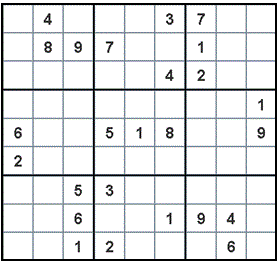
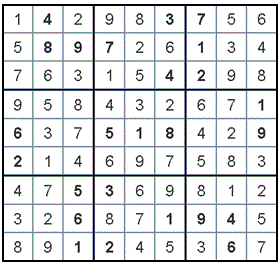
Here is an example of an initial puzzle:
and here is its solution:
Most of the functionality of your program should go in a class called
Sudoku, which you will use to represent an individual Sudoku puzzle.
We have provided you with skeleton code for this class in the file
Sudoku.java,
which you should download and modify.
The provided code includes:
-
a field called
gridthat refers to a two-dimensional array of integers. This array will be used to store the current contents of the puzzle, such thatgrid[r][c]stores the current value in the cell at rowr, columncof the puzzle. A value of0is used to indicate a blank cell. -
a field called
valIsFixedthat refers to a two-dimensional array of booleans. It is used to record whether the value in a given cell is fixed (i.e., part of the original puzzle).valIsFixed[r][c]istrueif the value in the cell at rowr, columncis fixed, andfalseotherwise. For example, in the original puzzle above, there is a fixed4in the cell at row0, column1(the second cell in the top row), and thusvalIsFixed[0][1]would betruefor that puzzle. -
a field called
subgridHasValthat refers to a three-dimensional array of booleans. This array allow us to determine if a given 3x3 subgrid of the puzzle already contains a given value. For example,subgridHasVal[0][0][7]will be true if the 3x3 subgrid in the upper-left corner of the board (a subgrid that we identify using the indices[0][0]) already has a7in one of its cells. See the comments accompanying this field for information about how the subgrids are numbered. -
partial implementations of methods called
placeVal()andremoveVal()that place a value in a given cell and remove a value from a given cell by updating the fields of the calledSudokuobject. You will need to add code to these methods to update any new fields that you add. -
a full implementation of a method called
readConfig()that takes aScanneras its only parameter and reads in an initial configuration of a Sudoku puzzle from thatScanner. This method assumes that this configuration consists of nine lines of text — one for each row of the puzzle — and that each line contains nine integers separated by whitespace, with 0 used to indicate a blank cell. For example, the initial configuration of the puzzle above would begin:0 4 0 0 0 3 7 0 0 0 8 9 7 0 0 1 0 0 ...
The method reads in the puzzle configuration and updates the called object accordingly. You should not need to change this method, because it calls
placeVal(), and you are already modifying that method as needed. However, we do recommend that you read and understand this method. -
the full implementation of a method called
printGrid()that prints out the current contents of the grid belonging to the calledSudokuobject. -
the skeleton of a method called
solveRB()that you will implement. This is the key recursive-backtracking method, and it should returntrueif a solution is found to the puzzle represented by the calledSudokuobject, andfalseif no solution has yet been found (i.e., if the method is backtracking). If the initial call to this method returnsfalse, that means that the initial puzzle is not valid, and therefore no solution can be found. If there is more than one solution (which can happen if the puzzle doesn’t have enough numbers in its initial configuration), your code should stop after finding one of them.The method takes a parameter
n, which is the number of the cell that the current invocation of this method is responsible for. We recommend that you consider the cells one row at a time, from top to bottom and left to right, which means that they would be numbered as follows:0 1 2 3 4 5 6 7 8 9 10 11 12 13 14 15 16 17 ...
Important notes:
-
Make sure that your
solveRB()method uses theplaceVal()andremoveVal()methods when updating the state of the puzzle. -
Make sure that you don’t attempt to assign a new number to cells that are filled in the original puzzle — i.e., cells whose values are fixed. Your
solve()method will need to skip over these cells somehow.
-
-
a full implementation of a “wrapper” method called
solve()that makes the initial call tosolveRB(), and that returns the same value thatsolveRB()returns. You should not change this method. -
the skeleton of a constructor. You should add the code needed to initialize the additional fields that you add.
-
a
main()method that will be executed when you run your Sudoku solver. You shouldn’t need to change this method, but we encourage you to review its use of the methods of theSudokuclass. In particular, note that it displays the puzzle after the solution is found, and thus it isn’t necessary for your recursive-backtracking method to display it.
Adding fields and methods
In addition to completing the methods mentioned above, you should also
add to the Sudoku class whatever additional fields or methods are
needed to maintain the state of a Sudoku puzzle and to solve it using
recursive backtracking.
To determine what additional fields are needed, ask yourself: What other fields do I need to be able to efficiently check the constraints of the puzzle – i.e., to determine whether a given value can be placed in a given cell? See our n-Queens solver for for another example of efficient constraint checking.
For full credit, your constraint-checking must be done without scanning through the rows and columns of the Sudoku board. For example, to determine if the current column contains a 5, you should not need to look at the other cells in the current column.
Make sure that you modify the placeVal() and removeVal() methods
so that they correctly update the fields that you add. In addition,
make sure that you employ proper encapsulation.
Sample puzzles
-
no_solution.txt, which has no solution -
multi_sol.txt, which has multiple solutions
A sample run of the program is shown below.
Enter the name of the puzzle file: puzzle1.txt

Here is the initial puzzle:
-------------------------------------
|   | 4 |   |   |   | 3 | 7 |   |   |
-------------------------------------
|   | 8 | 9 | 7 |   |   | 1 |   |   |
-------------------------------------
|   |   |   |   |   | 4 | 2 |   |   |
-------------------------------------
|   |   |   |   |   |   |   |   | 1 |
-------------------------------------
| 6 |   |   | 5 | 1 | 8 |   |   | 9 |
-------------------------------------
| 2 |   |   |   |   |   |   |   |   |
-------------------------------------
|   |   | 5 | 3 |   |   |   |   |   |
-------------------------------------
|   |   | 6 |   |   | 1 | 9 | 4 |   |
-------------------------------------
|   |   | 1 | 2 |   |   |   | 6 |   |
-------------------------------------

Here is the solution:
-------------------------------------
| 1 | 4 | 2 | 9 | 8 | 3 | 7 | 5 | 6 |
-------------------------------------
| 5 | 8 | 9 | 7 | 2 | 6 | 1 | 3 | 4 |
-------------------------------------
| 7 | 6 | 3 | 1 | 5 | 4 | 2 | 9 | 8 |
-------------------------------------
| 9 | 5 | 8 | 4 | 3 | 2 | 6 | 7 | 1 |
-------------------------------------
| 6 | 3 | 7 | 5 | 1 | 8 | 4 | 2 | 9 |
-------------------------------------
| 2 | 1 | 4 | 6 | 9 | 7 | 5 | 8 | 3 |
-------------------------------------
| 4 | 7 | 5 | 3 | 6 | 9 | 8 | 1 | 2 |
-------------------------------------
| 3 | 2 | 6 | 8 | 7 | 1 | 9 | 4 | 5 |
-------------------------------------
| 8 | 9 | 1 | 2 | 4 | 5 | 3 | 6 | 7 |
-------------------------------------
Submitting Your Work
Submission Checklist:
- You have read the Java Style Guide (linked on Course page)and followed all guidelines regarding format, layout, spaces, blank lines, and comments;
- ensured that the signature of the methods specified in the assignment have not been changed.
- You have verified that your programs satisfy all the performance tests in the templates;
Submitting your work for Part II
You should submit only the following files:
- Sudoku.java
- StringRecursion.java
-
ArrayRecursion.java
-
Click on the name of the assignment in the list of assignments. You should see a pop-up window with a box labeled DRAG & DROP. (If you don’t see it, click the Submit or Resubmit button at the bottom of the page.)
-
Add your files to the box labeled DRAG & DROP. You can either drag and drop the files from their folder into the box, or you can click on the box itself and browse for the files.
-
Click the Upload button.
-
You should see a box saying that your submission was successful. Click the
(x)button to close that box. -
The autograder will perform some tests on your files. Once it is done, check the results to ensure that the tests were passed. If one or more of the tests did not pass, the name of that test will be in red, and there should be a message describing the failure. Based on those messages, make any necessary changes. Feel free to ask a staff member for help.
Note: You will not see a complete Autograder score when you submit. That is because additional tests for at least some of the problems will be run later, after the final deadline for the submission has passed. For such problems, it is important to realize that passing all of the initial tests does not necessarily mean that you will ultimately get full credit on the problem. You should always run your own tests to convince yourself that the logic of your solutions is correct.
-
If needed, use the Resubmit button at the bottom of the page to resubmit your work. Important: Every time that you make a submission, you should submit all of the files for that Gradescope assignment, even if some of them have not changed since your last submission.
-
Near the top of the page, click on the box labeled Code. Then click on the name of each file to view its contents. Check to make sure that the files contain the code that you want us to grade.
Important
-
It is your responsibility to ensure that the correct version of every file is on Gradescope before the final deadline. We will not accept any file after the submission window for a given assignment has closed, so please check your submissions carefully using the steps outlined above.
-
Make sure to use these exact file names as specified or we will not be able to find your files and grade them.
-
Make sure that you do not try to submit a
.classfile or a file with a~character at the end of its name. -
If you make any last-minute changes to one of your Java files (e.g., adding additional comments), you should compile and run the file after you make the changes to ensure that it still runs correctly. Even seemingly minor changes can cause your code to become unrunnable.
-
If we are not able to compile your program, you will not receive any credit for that problem submission.
Last updated on October 9, 2026.